Posts

AP APPROVAL > EXPORT TO EXCEL (FINANCE)

Image
  [EXPORT TO EXCEL (FINANCE)] is a function that can sort the PO-issued details by a vendor. The exported sheet contains NAME, TOTAL AMOUNT, CURRENCY, TOTAL PRICE (amount to which an exchange rate is applied), ACCOUNT HOLDER, BANK NAME, ACCOUNT NO, SWIFT CODE, and BANK ADDRESS. With this function, a user can easily check how much it is to make each vendor's payment.

What is the folder-shaped icon?

Image
This folder-shaped icon is to open the path of the project files. Most of the paths are public folders with which employees can share the files such as sources and references. In order to use this function, a user must install (add) a chrome extension program named "Local Explorer." It can be downloaded from the following URL: https://chrome.google.com/webstore/detail/local-explorer-file-manag/eokekhgpaakbkfkmjjcbffibkencdfkl After installing the program, a user needs to set the default as follows: A user can enter the path by clicking the icon; as the folder-shaped icon is changed to a clickable icon once a path is entered, it needs to open the text area by pressing the [Enter] key in order to revise the path. Please see below the video showing how to enter the path.

What does "ETC" mean?

Image
[ETC]  is a relatively complicated index that many users have no idea about it. To process a project, we need external costs such as translation fees and internal costs like employees' time spent. "ETC" is the sum amount of these costs. If a user issues a PO, the external cost is updated and deducted from the sum amount above. * ETC = (EXP EXT COST + EXP INT COST) - (EXT COST+INT COST) In other words, it is the expected costs left that a user needs to complete the project.  By the way, when a project is finished, the costs can be changed due to some circumstances. In this case, a user may adjust the ETC's value to "0", which expresses "no more costs necessary."  And a user can check the project's completion rate with this index. The status of "no more costs necessary" means that the project is completed 100%.  "ETC" is an abbreviation of "Estimation To Completion," which means the expected costs left to complete th...

When is the notification email sent?

Image
  Case  Recipient Email title Write Task Request Who is included as a recipient [Writer] Task Request: Pxxxxxx (Project number) – Project name Accept for handoff PM, SUB PM [Writer] Task accepted: Pxxxxxx –  Project name Decline for handoff PM, SUB PM [Writer] Task declined: Pxxxxxx –  Project name Handback PM, SUB PM, Sub-assignee [Writer] Handback: Pxxxxxx – Project name PO issuance PO recipient (vendor) [Writer] PO: Pxxxxxx – Project name Decline for PO PM, SUB PM [Writer] PO declined: Pxxxxxx - Project name Create query POC/BD, PM, SUB PM, Sub-assignee [Writer] Query: Pxxxxxx – Project name Note)  A confirmation email for PO is not sent.

Resend a task request

Image
  Once a task request is sent, the [Send] button is changed to [Resend]. A user can resend an updated task request by clicking this button.  The details written in the previous request can be checked on the [Write Task Request] window, but as the vendor information is already displayed on the project line, it's not included in the [Resend] window. Please note, when resending is performed, the existing request contents (due date/time, TASK STATUS, and PROJECT STATUS, etc.) are displayed on the project list until the new request is confirmed.

ETprocess QSG (Quick Start Guide) for Vendor Users

Image
  <Please click the image to view in the original size with better visibility.>

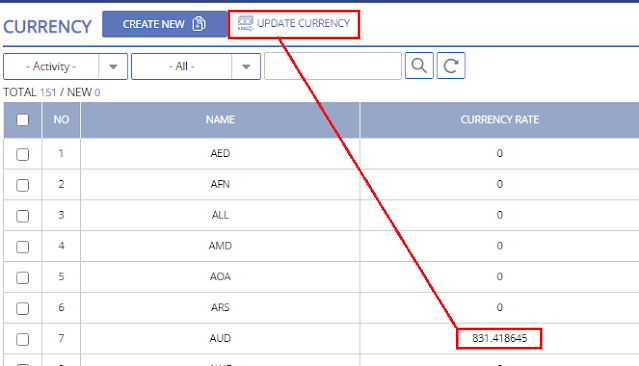
Set up (update) currency

Image
A user can set up the currency by clicking the [UPDATE CURRENCY] button manually on the [SETUP] - [CURRENCY] menu. It is updated based on European time as it is taken from the European Central Bank. If a user wants to get more accurate data into ETprocess, Updating currency daily is necessary.